
Google Flights Search Anywhere lets you search flights without picking a destination first. You enter your home airport and travel dates, then Google Flights shows the cheapest places to fly on a map. It’s perfect for budget travelers and anyone open to spontaneous trips, helping you spot deals you’d never find with a standard search.
Planning a trip usually starts with a question: where do you want to go? But what if you flipped that around and let the price decide for you? That’s the idea behind Google Flights Search Anywhere—a tool built for travelers who care more about a great deal than a specific spot on the map.
This feature has quietly changed how many people book flights. Instead of locking yourself into one city, you can browse an entire world of options and watch the prices guide you toward your next adventure. Maybe you’ve always wanted to see Lisbon, but Google Flights shows you a round-trip to Athens for half the cost. Suddenly, your plans get a lot more interesting.
In this guide, you’ll learn exactly how Google Flights Search Anywhere works, plus a collection of Google Flights hidden features, money-saving Google Flights hacks, and smart strategies for using Google Flights flexible dates. We’ll also walk through a complete flight booking guide and show you how to handle flight, hotel & transfer booking using Google’s connected tools. By the end, you’ll know how to find cheaper trips with less effort.
What Is Google Flights Search Anywhere and How Does It Work?
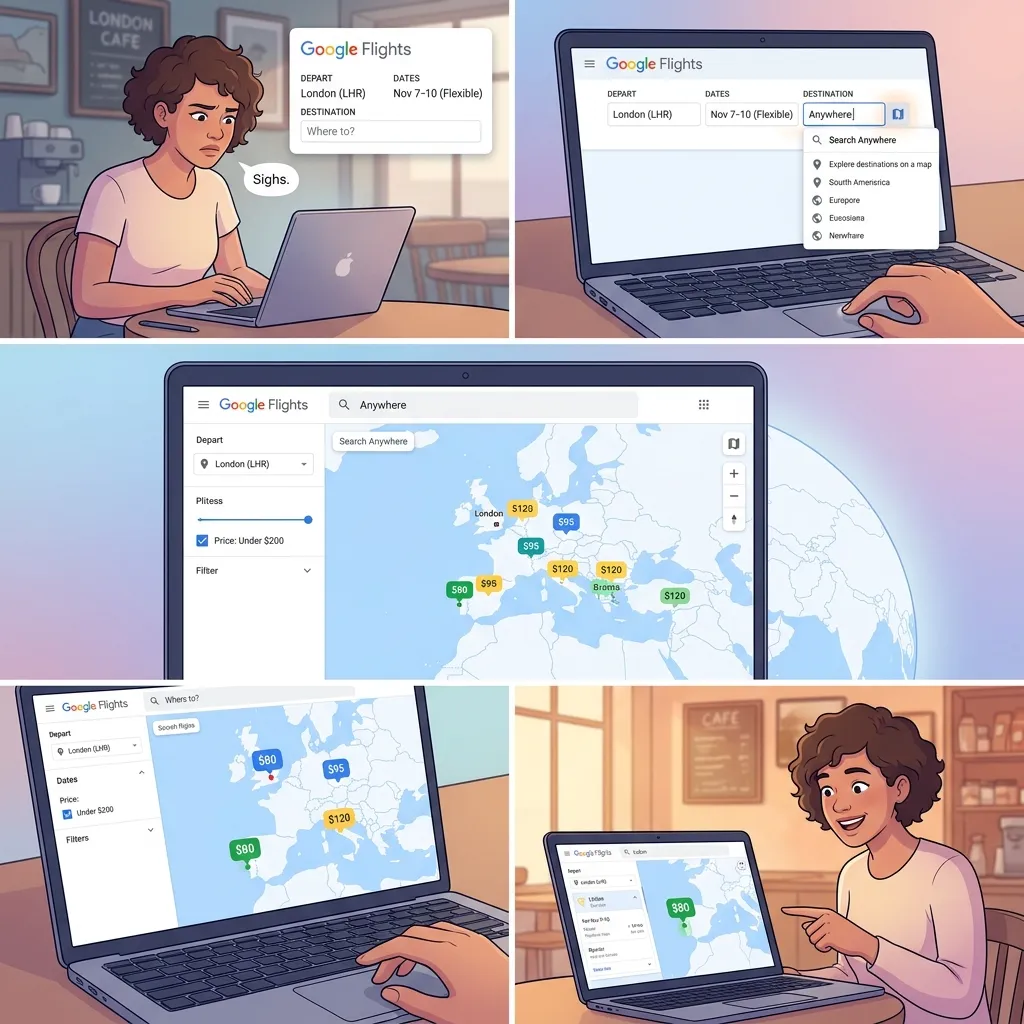
Google Flights Search Anywhere is a search method that removes the destination from the equation. Rather than telling Google where you want to go, you simply tell it where you’re starting from. Google Flights then scans fares across hundreds of destinations and displays the lowest prices on an interactive map.
The feature lives inside the “Explore” section of Google Flights. It’s designed for open-minded travelers who value flexibility and savings over a fixed itinerary.
Here’s how to use Google Flights Search Anywhere step by step:
- Go to google.com/travel/flights and click Explore in the left-hand menu.
- In the origin field, type your home airport or city.
- Leave the destination field set to “Anywhere.”
- Choose your dates, or select flexible options like “1 week” or “weekend.”
- Browse the map. Each location shows a price tag, so you can instantly compare destinations.
For example, a traveler in Chicago could open Explore, type “Chicago,” keep the destination as “Anywhere,” and discover that a weekend in Nashville costs $98 round-trip while a week in Cancún runs $310. The map does the comparison work for you.
Google Flights Hidden Features Every Savvy Traveler Should Know
The real power of this platform goes far beyond the basic search. These Google Flights hidden features can save you serious money and time.
How does the Google Flights price graph help you book at the right time?
The price graph shows how fares rise and fall across different dates. When you select a destination, click the Price graph option to see a visual timeline. Lower bars mean cheaper days. This lets you shift your trip by a day or two and pay less for the same route.
What is the date grid, and how do you use flexible dates?
The date grid displays a chart of departure and return date combinations, each with its own price. By scanning this grid, you can quickly find the cheapest pairing. Google Flights flexible dates often reveal that flying out on a Tuesday and returning on a Saturday costs far less than a standard Friday-to-Sunday trip.
Can you search multiple airports at once?
Yes. Google Flights lets you add several airports in both the origin and destination fields. If you live near two or three airports, search all of them together. A flight from a smaller regional airport can sometimes be hundreds of dollars cheaper than one from the main hub.
What’s the difference between “Anywhere” and searching a specific region?
When using Search Anywhere, you can narrow your map to a continent or country instead of the whole world. Zoom into Europe, Southeast Asia, or South America to focus your deal hunting. This is helpful when you have a rough idea of the region you want but remain open on the exact city.
What tips and insights does Google Flights provide?
Google Flights often displays helpful notes such as “Prices are currently low” or “Prices are typical for your search.” These insights pull from historical fare data, giving you a sense of whether to book now or wait.
Google Flights Hacks for Maximizing Your Savings
Beyond the built-in tools, a few clever Google Flights hacks can stretch your travel budget further.
Does incognito mode actually get you cheaper flights?
This is one of the most debated travel myths. Google has stated that it does not raise prices based on your search history. That said, browsing in incognito mode costs nothing and removes any doubt, so many travelers still use it for peace of mind.
Can combining one-way tickets save money?
Sometimes, yes. Booking two separate one-way tickets—even on different airlines—can be cheaper than a single round-trip fare. Google Flights makes this easy to test by letting you search one-way options independently.
Why should you check nearby airports?
Flying into or out of a secondary airport can dramatically cut costs. For instance, choosing a budget-carrier hub near your destination, then taking a short train or bus, may save more than the cost of the transfer itself. This is one of the most reliable Google Flights hacks for big savings.
How do you understand fare types and baggage policies?
A cheap ticket isn’t always the best deal. Basic economy fares often exclude carry-on bags or seat selection. Google Flights shows fare details and baggage fees during the booking process, so always read these before you commit.
How do you set up price alerts effectively?
Once you pick a route, toggle on Track prices. Google Flights will email you when fares drop or spike. Set alerts a few months ahead of your trip to catch the lowest window.
The Art of Flexible Dates: Finding the Cheapest Time to Fly

Few things affect airfare more than timing. Mastering Google Flights flexible dates is one of the fastest ways to cut your costs.
How does the flexible date calendar work?
When you enter a route, click the date field and Google Flights shows a calendar with prices on each day. Cheaper days appear in green, while pricier ones show in red or gray. This visual layout makes it simple to spot the best value at a glance.
How do you identify off-peak travel times?
Prices climb during school holidays, summer, and major events. Traveling in shoulder seasons—the weeks just before or after peak periods—often delivers similar weather at a fraction of the price. The price graph and date grid both highlight these windows.
Do weekdays really cost less than weekends?
Generally, yes. Departing midweek, especially on Tuesday or Wednesday, tends to be cheaper than Friday or Sunday departures. According to multiple airfare studies, midweek flights can save travelers a noticeable percentage compared to weekend trips. Shifting your departure by a single day can add up to real savings.
A Complete Flight Booking Guide: From Search to Confirmation
A solid flight booking guide helps you move from browsing to a confirmed seat without costly mistakes.
What are the best practices for entering your search criteria?
Start broad, then narrow. Begin with flexible dates and multiple airports to see the full range of prices. Once you spot a strong deal, lock in your specifics. Always double-check the number of passengers and cabin class before searching.
How should you evaluate layovers and connection times?
A long layover can turn a cheap flight into an exhausting one. As a rule, allow at least 90 minutes for domestic connections and two to three hours for international ones. Google Flights flags “short connection” warnings to help you avoid tight transfers.
Should you book directly with the airline or through an online travel agency?
Booking directly with the airline usually makes it easier to change or cancel a flight and to resolve problems. Online travel agencies (OTAs) sometimes offer lower prices, but customer service can be slower. If the savings are small, booking direct is often the safer choice.
What should you do after booking?
After you confirm, save your reservation number, select your seat, and add the trip to your calendar. Check in online 24 hours before departure to secure your spot and avoid extra fees.
Flight, Hotel & Transfer Booking With Google’s Connected Tools
Google’s travel ecosystem makes it possible to plan an entire trip in one place. Coordinating flight, hotel & transfer booking through these connected tools keeps everything organized.
How does Google Flights connect with Google Hotels?
After you choose a flight, Google often suggests hotels at your destination through Google Hotels. You can filter by price, rating, and location, then compare options on a map right beside your travel dates.
How do you find ground transportation?
Google Maps integrates directly into your planning. Once you know your destination, Maps shows public transit routes, ride-share estimates, and rental options, making the transfer portion of your trip easy to arrange.
How do you build a seamless itinerary?
Reservations booked through Gmail and Google’s travel tools often appear automatically in your Google account under “Trips.” This gathers your flights, hotels, and activities into one organized view you can access offline.
Are travel packages worth booking?
Bundled packages can save money when flights and hotels are booked together, but always compare the package price against booking each piece separately. Sometimes the savings are real; other times, separate bookings win.
Real-World Examples of Search Anywhere in Action
Travelers around the world use Google Flights Search Anywhere to uncover trips they never planned. One common scenario: a couple with a flexible weekend and a $200 budget opens Explore, sets the destination to “Anywhere,” and discovers a coastal getaway just two hours away for $120 round-trip.
Another frequent story involves digital nomads. With no fixed home base, they use Search Anywhere to find the cheapest launch point for their next month abroad, letting price shape the journey. These real-world uses show why the feature has become a favorite among budget-minded explorers.
Troubleshooting Common Search Anywhere Problems
Even powerful tools have hiccups. Here’s how to handle the most common ones.
If Search Anywhere doesn’t show the results you expect, try widening your date range or removing filters like specific airlines or stop counts. Overly narrow settings hide cheaper options.
Prices on the map update in near real time, but fares can change between your search and checkout. If a price jumps, refresh the page or check the airline directly. Small discrepancies usually reflect fast-moving fare changes, not errors.
The Future of Travel Planning With Google Flights

Google continues to add smarter tools to its travel platform. Predictive features already estimate whether prices will rise or fall, and AI advancements are likely to make these forecasts even more accurate over time.
Expect deeper integration across flights, hotels, and ground transport, along with more personalized suggestions based on your travel habits. As these tools grow, Google Flights Search Anywhere will likely become even better at matching travelers with deals that fit their budgets and interests.
Your Passport to Limitless Adventures
Google Flights Search Anywhere turns travel planning on its head. Instead of starting with a destination and hoping for a good price, you start with your budget and let the world open up. Combined with Google Flights hidden features, proven Google Flights hacks, and the power of Google Flights flexible dates, you have everything you need to travel more for less.
The next step is simple: open the Explore tab, set your destination to “Anywhere,” and see where the deals take you. Pair it with a smart flight booking guide and Google’s connected tools for flight, hotel & transfer booking, and your next great trip might be one you never saw coming.
FAQs About Google Flights Search Anywhere
What is Google Flights Search Anywhere?
Google Flights Search Anywhere is a feature in the Explore tab that lets you search flights without choosing a destination. You enter your home airport and dates, and Google Flights shows the cheapest places to fly on a map.
Is Google Flights Search Anywhere free to use?
Yes. Google Flights and its Search Anywhere feature are completely free. You only pay when you book a flight through the airline or travel agency it links to.
How accurate are the prices shown in Search Anywhere?
Prices update in near real time and are generally reliable. However, fares can shift quickly, so the price you see may change slightly by the time you reach checkout.
Can I use Google Flights flexible dates with Search Anywhere?
Yes. You can pair flexible options like “weekend,” “1 week,” or a custom date range with Search Anywhere to find the cheapest combination of destination and travel dates.
Does incognito mode get me cheaper flights on Google Flights?
Google has stated it doesn’t raise prices based on browsing history. Using incognito mode won’t hurt, but it isn’t a guaranteed way to find lower fares.
What are the best Google Flights hacks for saving money?
Top Google Flights hacks include searching nearby airports, combining one-way tickets, using flexible dates, setting price alerts, and narrowing your map to a specific region.
How do I set up price alerts on Google Flights?
After choosing a route, toggle on “Track prices.” Google Flights will email you when fares drop or rise, helping you book at the right moment.
Can I book hotels and transfers through Google?
Yes. Google Flights connects with Google Hotels for lodging, and Google Maps helps you arrange ground transport, making flight, hotel & transfer booking simple in one ecosystem.
What’s the cheapest day to fly according to Google Flights?
Midweek departures, especially Tuesday and Wednesday, are often the cheapest. The price graph and date grid help you confirm the lowest-cost days for your specific route.
Why is Search Anywhere not showing good results?
If results look limited, widen your date range and remove filters like airline or stop preferences. Narrow settings often hide cheaper options.
Should I book directly with the airline or through an OTA?
Booking directly with the airline usually makes changes and cancellations easier. OTAs may offer lower prices, but their customer service can be slower, so weigh savings against convenience.
Who benefits most from Google Flights Search Anywhere?
Budget travelers, spontaneous explorers, and flexible digital nomads benefit most. If your dates or destination are open, Search Anywhere helps you find deals you’d otherwise miss.